Create Broken Objects Window
The Create broken objects window bakes broken versions of a mesh and sets up the object to break. You can create several broken variations of the same object here.
Open it from Window → Create broken objects, then select a GameObject that has a Mesh Filter component. Until you do, the window only shows a hint to select one.
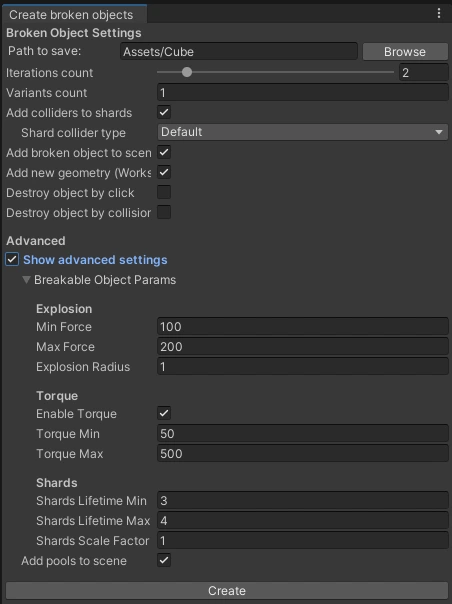
Broken object settings
Path to save — the folder where broken objects are saved. Only a path inside the Assets folder is valid. Browse opens a folder picker.
Iterations count — more iterations, more shards. The slider goes from 1 to 10; 10 iterations give about 1000 shards.
Variants count — how many differently broken versions of the object to create. All variants are saved into one broken object collection, and a random one is used each time the object breaks.
Add colliders to shards — should shards collide with each other and with objects in the scene?
- Shard collider type — a Mesh Collider is added to each shard by default. Use other collider types if you want some optimization.
Add broken object to scene — adds the broken version of the object to the scene near the original object.
Add new geometry — generates surfaces inside broken objects. UV coordinates are taken from nearby vertices and interpolated.
Important: this works properly only if your mesh is convex. If your mesh is concave or too complex, you may see problems or graphical artifacts.
Destroy object by click — adds a component that reacts to a mouse click or finger tap and destroys the object.
Destroy object by collision — adds a component that reacts to collisions and destroys the object.
- Is kinematic — shown when Destroy object by collision is on. Makes the Rigidbody on the breakable object kinematic, so physics doesn't move it before it breaks.
Object collider type — shown when either Destroy toggle is on. A collider must be on the main object to detect clicks or collisions. A Mesh Collider is added by default. Use other collider types if you want some optimization.
Press Create to bake.
Advanced options
Turn on Show advanced settings to see them. These options can also be found on the created BreakableObject component. They determine the flight speed and the lifetime of the shards.
| Group | Setting | Default | What it does |
|---|---|---|---|
| Explosion | Min Force, Max Force | 200, 600 | Each shard gets a random explosion force in this range. |
| Explosion | Explosion Radius | 10 | Radius of the explosion force. |
| Torque | Enable Torque | Off | Adds a random spin to each shard. |
| Torque | Torque Min, Torque Max | 50, 500 | Range of that spin. |
| Shards | Shards Lifetime Min, Shards Lifetime Max | 3, 4 | Seconds the shards stay before they go back to the pool. |
| Shards | Shards Scale Factor | 1 | Scale of the broken object relative to the original. |
Add pools to scene — adds the BrokenObjectPools object to the scene, or turns an existing one back on. Shards need it at runtime; see Broken object pools.